What is Bing Image Creator?
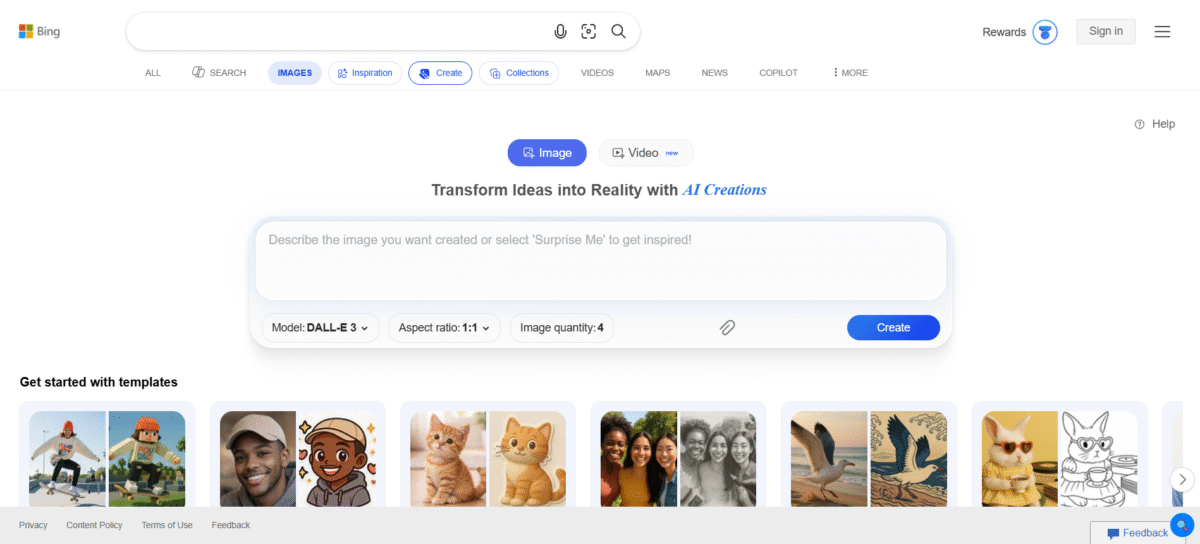
It is an AI-powered image creation Bing tool powered by Microsoft that lets one create realistic and unique images from a prompt. For example, rather than relying on traditional design software and manual illustration techniques, they simply describe what they want to see, and the tool instantly converts those words into interesting images.
It was launched in March of 2023, and from then on, it has been absolutely upgraded to become better and better. With each update, Bing Image Creator is increasingly able to understand detailed instructions that include creative concepts, an artistic style, and visual elements such as lighting, textures, and even style.
The tool uses OpenAI’s famous DALL-E 3 text-to-image model. It is a deep learning model that undergoes extensive training. Because it is trained on diverse datasets, this model interprets the natural language prompts with high precision. As a result, its generated images closely match the user’s intent, even when prompts are complex or imaginative.
As a trusted Microsoft licensing partner, Microsoft ensures that a tool such as this maintains compliance and reliability for business and individual users alike.
Key Features of Bing Image Creator
-
Advanced AI Model – DALL-E 3
It generates high-quality images and adheres to prompts.
-
Text-to-Image
Create images with the help of plain text descriptions in just seconds!
-
Style Flexibility
Styles for images such as photorealistic, illustration, digital media, watercolor, anime, and abstract images.
-
Microsoft Ecosystem Integration
Works well with the Bing search engine and Microsoft accounts.
-
Prompt Enhancement:
Automatically improves the prompt to provide the best output.
-
Safe and Responsible AI
The system has built-in safeguards that prevent misuse as well as violation of
-
Free Access with Limits
Graphical content can be generated without requiring any upfront costs from the user.
How to Use Bing Image Creator
- Sign in with your Microsoft account.
- Open the Bing Image Creator using the Bing or the Microsoft platform.
- Enter a text prompt describing the image you would like.
- Click “Create” and wait a few seconds to receive the results.
- Choose to review various generated pictures and download the image of your preferred picture.
Who Can Use Bing Image Creator
- Content creators creating blog visuals or social media graphics
- Marketers creating campaign visuals, advertisements, etc.
- Designers who are exploring concepts and inspiration
- Students and educators engaged in creative projects
- Business owners who need quick visuals for their presentations
- Hobbyists who practice AI art experimentation.
Pros & Cons
Pros:
- Free to use if you have a Microsoft account
- High-quality image output
- Easy and Intuitive Interface
- Strong Prompt Understanding
- Safe Usage & Compliant Use of AI
Cons:
- Limited Image Generation Per Day
- Needs an internet connection
- Less manual control than with advanced design software
- Image editing options are limited
Pricing & Plan
Bing Image Creator is free to use, but its usage is on a credit-based model. Users are offered a free amount of fast image generation every day.
Once the credits have been used, the creation of the image continues, although more slowly, until further credits are earned using the Microsoft Rewards.
There is no paid subscription service available for Bing Image Creator as such.