Businesses repeat the same activities every day. For example, they may handle customer requests, process documents, keep records, etc. With the growing use of AI tools, understanding AI workflow automation is important for teams that want to reduce manual work.
According to McKinsey, 78% of businesses have used AI in at least one business area in 2025. This shows how fast the use of AI is extending into everyday business practices.
What Is AI Workflow Automation?
AI workflow automation is the use of AI for automating a series of connected activities in a business process. Instead of a workflow that strictly uses only fixed rules, an AI-based workflow can process information and select the next step of action.
For example, when a client sends an email stating that the order was received in bad condition, the client requires a replacement. While simple automation will forward the email to the support team, AI automation will use the client’s request to detect the problem, locate order information, classify the request, and route it to the appropriate process/employee.
How Does AI Workflow Automation Work?
An AI workflow generally connects several steps.
Input → AI analysis → Decision → Action → Review or completion
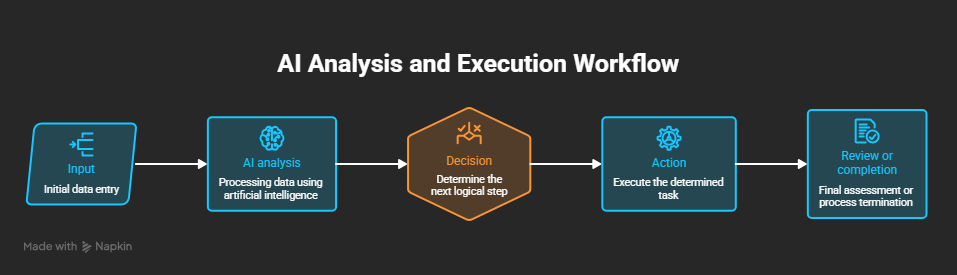
First, the process gets data from sources like emails, forms, documents, and business applications. After that, AI is used to analyze the data and interpret its meaning.
The workflow can use the knowledge to find what needs to be done next. The workflow can update a database, generate a task, send a message, retrieve data, or ask a human employee for approval.
For example, a staff member may file a request to access a certain software application. An AI-based workflow could understand the request, identify the department the staff member belongs to, see whether approval is needed, forward the request to the right manager, and inform the staff member of the outcome.
This reduces the need for staff to manually transfer data from one stage to another.
AI Workflow Automation vs. Traditional Automation
Traditional automation usually depends on predefined rules.
For example:
When a customer submits a form → create a CRM record → assign it to sales.
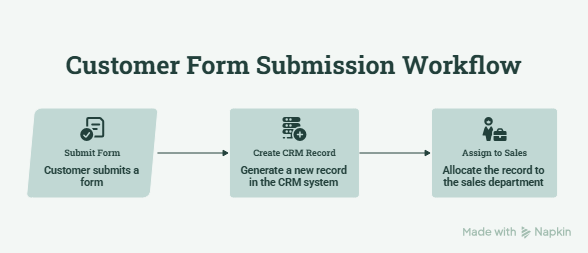
The technique works well when the process is predictable. It is not effective when information is recorded in different ways or when a request needs some interpretation.
AI adds a layer of understanding to the process. It is capable of analyzing natural language, documents, and other forms of data prior to taking any further action.
It does not mean that traditional automation is no longer useful. In many cases, companies may adopt both techniques together. AI may perform work that needs understanding, whereas traditional automation may deal with predictable activities.
What Is AI Agent Workflow Automation?
If you ask what AI agent workflow automation is, the main difference is that AI agents can manage more dynamic multi-step tasks.
The AI agent can be provided with a target, find out how to reach that target, make use of related resources, and adapt to the information it receives.
For example, the onboarding process of an employee can involve multiple departments and systems. Here, the AI agent can direct activities such as creating employee records, requisitioning hardware, submitting access requests, and informing the appropriate departments.
Instead of dealing with individual tasks, the agent can assist in managing the entire process.
Where Can Businesses Use AI Workflow Automation?
- Customer support: Artificial intelligence can categorize queries, recognize customer problems, access relevant information, and assign cases to the right department.
- Human Resources: The HR team can automate certain parts of the hiring process, record-keeping, internal queries, and the employee helpdesk.
- IT Operations: The AI workflows can classify tickets, resolve common inquiries, and route complicated problems to the right IT employee.
- Sales: Workflows can update client data, generate follow-up tasks, and coordinate actions after closing the sale.
- Finance: AI can extract information from invoices, classify expenses, and direct transactions for approval.
Benefits of AI Workflow Automation
Value depends on the design of the workflow process. Even if a workflow is automated, it will not automatically make it better.
Common benefits include the following.
- Less manual data entry
- Faster processing of routine requests
- Reduced repetitive administrative work
- Better coordination between business systems
- More consistent handling of routine processes
- More time for employees to focus on complex work
What Should Businesses Consider Before Automating?
A company must be clear about which business process it wants to improve. Identify activities that are performed regularly, require much employee effort, and have a specific output.
Data Quality is also key. Reliable data is necessary for the AI to provide valuable outcomes. There should also be a review of security concerns, access, and human authorization when using AI on important systems.
For sensitive tasks, human intervention can serve as another layer of control. Workers need to be able to verify, modify, or halt an automated process where necessary.
Wrapping It Up
The objective is not to automate everything but to identify the tasks in which AI will remove unnecessary manual tasks and include humans where judgment calls are required. With the correct process chosen for AI, automation of workflows will make everyday tasks easy, simple, and faster.