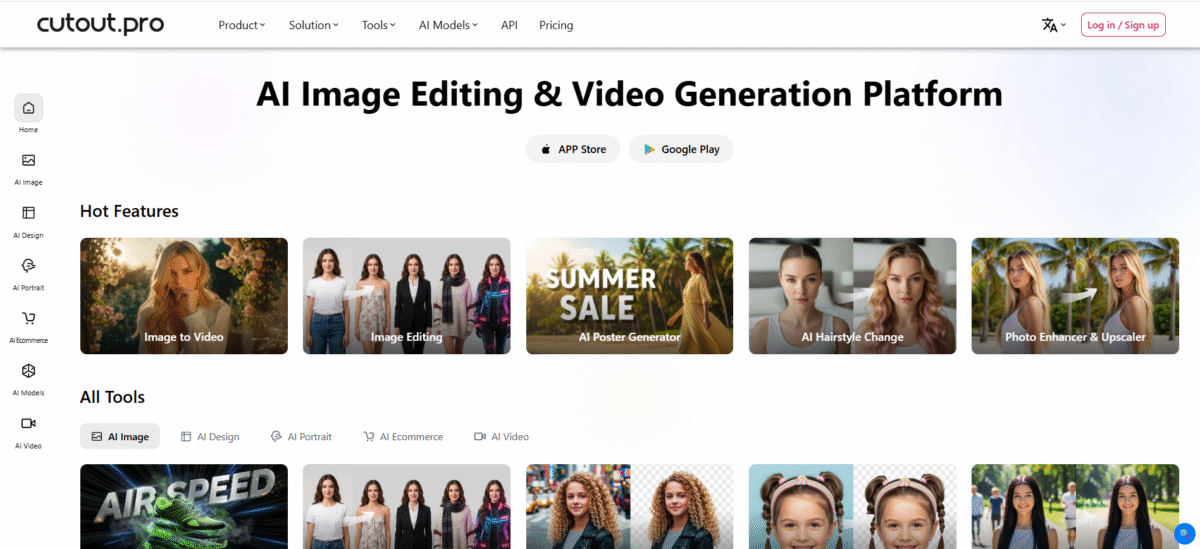
What is Cutout.Pro?
Cutout.Pro is a top-tier visual content generation platform that makes use of AI and computer vision to automate complex image and video editing processes.
It can be used as a photo editor or background remover, instantly isolating objects, enhancing resolution, or creating AI art.
Whether it is the cutout pro application on your mobile phone or the desktop version, you can definitely get the job done with this application without the need for any other designing tools, such as Photoshop.
Key Features of Cutout.Pro
-
Background Removal
Cutout.Pro uses AI for background removal, which helps edit images of products or portraits.
-
Batch Processing
This ingenious content- generating platform allows batch uploads, making it suitable for people dealing with large numbers of images.
-
Image Enhancements
Cutout.Pro provides image enhancement features, such as resizing and quality improvement.
-
Customizable Outputs
It provides a variety of output options, including PNG and JPEG, for images.
How to Use Cutout.Pro
- To access Cutout Pro’s free features, you need to create an account.
- Click on “Upload Image” or drag and drop your file.
- The AI will automatically detect and remove the background using Cutout Pro.
- Click on “Download” to save your file.
Who Can Use Cutout.Pro?
1. E-commerce Sellers
For automating background removal of images for e-commerce platforms like Amazon or eBay.
2. Photographers & Designers
For speeding up photo editing tasks by employing AI for complex selection, hair/semi-transparent object removal, and quick object removal like Magic Eraser.
3. Content Creators & Marketers
For creating marketing materials, photo editing, and background removal without requiring in-depth knowledge of photo editing software.
4. Individual/Casual Users
For improving personal images, creating cartoon selfies, editing anime, or creating passport images.
Pros & Cons
Pros
- Highly accurate and fast background removal tool
- Consists of a complete set of AI tools for images and videos in one place
- Come swith user-friendly interface which is ideal for beginners and professionals alike
- Generous free plan and API available for developers
- Comes with satisfactory processing speed and output quality
Cons
- Advanced features and high-volume usage require paid plans.
- Output resolution for some AI generators may have limits for a free tier.
- Can be resource-intensive for very large video files.
Pricing & Plans
Free Trial
New users get 5 free credits to try high-resolution downloads. Unlimited previews are available for free, but not in high resolution.
Subscription Plans (Monthly)
The plan is for regular users, and rollover is available up to 5 times the monthly budget.
- 80 credits/month: $5.00 ($0.063/credit).
- 170 credits/month: $9.90 ($0.058/credit).
- 300 credits/month: $16.90 ($0.056/credit).
- 550 credits/month: $29.00 ($0.053/credit).
- 1000 credits/month: $49.00 ($0.049/credit).
- 1450 credits/month: $69.00 ($0.048/credit).
Pay As You Go (One-time)
Best for occasional usage, these credits do not expire.
- 3 credits: $2.99 ($0.997/credit).
- 10 credits: $4.99 ($0.499/credit).
- 100 credits: $39.00 ($0.390/credit).
- 300 credits: $79.00 ($0.263/credit).
- 1000 credits: $199.00 ($0.199/credit).
- 30000 credits: $1399.00 ($0.047/credit).
Video Background Removal Pricing
Video processing is billed separately and is often billed by the hour.
- 1 minute: $19 ($0.317/second).
- 3 minutes: $29 ($0.161/second).
- 15 minutes: $129 ($0.143/second).
- 45 minutes: $299 ($0.111/second).
- 120 minutes: $599 ($0.083/second).