Have you met this kind of co-worker before, who would reconcile expense reports of five currencies for eight hours straight without getting tired of it? Well, by 2026, such a co-worker is an AI agent. For years, the work sat with teams because it was too repetitive for people, but too context-heavy for basic automation. AI agents are changing that equation. They are built to handle defined tasks inside a workflow and pull context from business systems.
To keep pace with this tech advancement, nearly 15% of business processes are expected to reach semi- or full autonomy in the next 12 months, and customer service, IT, and sales are identified as the areas seeing the fastest adoption.
Now, the million-dollar question for CTOs, CEOs, VPs, directors, and other stakeholders sitting in a boardroom is not, “Should we explore this?“ It is which process do we automate first, and what will we lose if we keep waiting? Two to three years ago, businesses were just using simple pilots or chatbots. But in 2025-26, those who actually integrated these agents into their daily workflows began seeing visible results.
This guide answers every question on how to create autonomous AI agents. Read it till the end to bridge that gap by developing a custom AI agent for your business.
AI Agent Use Cases and Meaning
An AI agent is a type of software that can take a goal as input and work out the steps needed to get there. These agents use connected tools to do the work and keep going until the task is finished. To make it really simple, it is a system that gives you the outcome without telling it exactly what to do at every step.
That is what makes an AI agent different from a chatbot. A chatbot usually waits for your next question and replies. An agent is more active. It has its own brain to think, look at the situation, and take action.
Where AI Agents Create Business Value?
AI agents create the most value when a task has several steps, depends on information from more than one system, and follows a predefined pattern. That is why they work well in business functions where people spend time collecting context and moving work from one stage to the next. Some of the most impactful AI agent use cases can be:
Customer Support
AI agents can handle repetitive Tier 1 requests from start to finish. They check customer information, find the right answer in a knowledge base, write a response, and escalate cases that fall outside defined rules. These agents make a big difference by automating answers for 30% of questions and cutting down on the time it takes to handle them by 3 minutes.
Finance and Reporting
In finance and reporting, agents can get numbers from linked systems, find strange entries, make a summary, and send it to the right stakeholder. HighRadius, a finance automation company, used this agentic automation to cut down on the manual work by 1/3.
HR Department
AI agents can screen applicants against certain criteria, set up interviews, answer questions about company policies, or keep candidates and employees up to date without having to keep going back and forth. Chipotle is rolling out a new AI assistant, Ava Cado, to handle everything from FAQs and interview scheduling to job offers. The system is designed to slash recruitment time by 75%.
Sales and Marketing
AI agents can also pull up account history, make meeting briefs, suggest the next best action, and can also pump out personalized offers and sales pitches 10x faster in real time. When these agents are connected with tools built for marketing agencies, they can also fit more naturally into existing campaign, client, and collaboration workflows instead of operating as another isolated system. It’s basically killing off the old silos between marketing, sales, and pricing, so the whole team is finally on the same page.
Operations Department
In operations, AI agents can keep an eye on incoming alerts, sort problems by priority, and send them to the right team. They can keep the workflow going without anyone having to check and follow up on every item by hand.
Four Core Components of an AI Agent
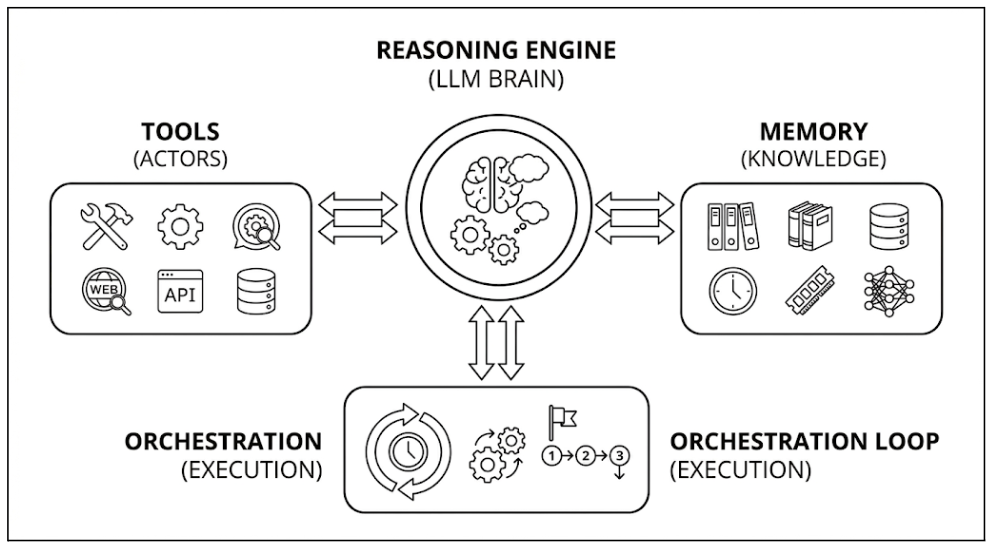
All the AI agents, simple or advanced, run on the same four building blocks. If you understand them, it becomes much easier to judge if the agent is prod-ready or just a demo.
1. Brain
The part that does the reasoning is called the large language model (LLM). It figures out what the goal is and either makes a response or calls a tool. This is the agent’s decision engine.
Model choice matters when you’re deciding this brain. A better model may be better at handling tasks with multiple steps, edge cases, and unclear instructions, but it usually has a higher latency and costs more per interaction. A lighter model might be fast and affordable for large workloads, but it might have trouble when the job needs more careful tool use or deeper thinking.
You should not only look at benchmark scores to judge the model, but also at its context windows. Pick the right tool that can retain your inputs and give structured outputs in a format that is easy to understand. A small drop in tool-call reliability can cause the entire chain to fail.
2. Tools
An AI agent can only talk if it does not have any tools. With tools, it can actually execute something. Tools are the functions or system connections that let the agent do something useful, such as searching internal documents, looking up customer records, creating a ticket, updating a database, sending an email, or starting the next step in a workflow. For example, businesses using AI for customer acquisition can connect these systems to support leads for local businesses, helping teams organize prospect information and trigger timely follow-up.
Allowing an agent to read a knowledge base is very different from allowing it to write to a CRM or send messages on behalf of a team. For this reason, tool planning must be done carefully, with clear boundaries.
Tools are defined through a schema that describes what the tool does, it accepts, and output it should return. The model reads that definition and decides when to use it. This is where precision matters. If a tool description is vague, the model may call the wrong tool or pass the wrong parameters. Domain-driven agent design usually means keeping tools narrow and specific.
AI developers and organizations are now preferring standard tool-use protocols. One example is the Model Context Protocol (MCP), which connects models to tools and data sources. It can make agent integrations more portable across systems.
3. Memory
Memory is what allows an agent to stay useful beyond a single prompt. At the simplest level, memory can mean the recent conversation history in the current session. In a more advanced setup, it can also include user preferences, past actions, prior decisions, unresolved tasks, or relevant business context pulled from external storage.
There are usually two layers of memory. Short-term memory sits in the prompt or working context of the current interaction. It is simple, but it runs into token limits quickly and can become expensive. Long-term memory is usually stored outside the model, often in a database, vector index, or application state store.
In many production enterprise AI agent solutions, semantic retrieval is used to bring back the most relevant past information instead of forcing the model to carry everything in context all the time. That approach is more scalable, but it only works well if the retrieval quality is good.
If the wrong context is fetched, the agent may sound confident while acting on the wrong information. To solve this problem, AI developers should implement retrieval evaluation as part of their testing pipeline. They should regularly benchmark to check whether the right chunks are being surfaced for a given query before any agent goes live.
4. Orchestration Loop
The orchestration loop is the part most users never see, but it is often the reason one agent feels reliable, and another feels chaotic. It manages state transitions, tool execution, error handling, timeout logic, response validation, and handoffs between model reasoning and system actions. This layer may also apply approval checks before certain actions are allowed to go through.
A well-designed orchestration loop sets stop conditions, limits the number of iterations, logs failures, and stores state. It also knows when to escalate to a human instead of continuing blindly.
How to Build an AI Agent Step by Step Process?
Building an AI agent is very different from developing a chatbot or a language model, both from a technical and a business perspective. An AI agent looks at the situation, remembers things from one step to the next, decides when to use tools and takes actions that have real effects inside your systems. To build AI agents for business, follow these steps:
1. Define the Agent’s Purpose and Decision Boundaries
Before starting anything, ask a question: what are you developing an AI agent for, and where does its authority stop? This is more important than it sounds.
An AI agent without defined decision boundaries will either become too cautious refusing to act when it has enough information to proceed. Or it will do too much taking actions in other systems it was never meant to touch. To avoid both mistakes:
- Define specific tasks, such as invoice reconciliation, rather than trying to improve overall productivity to enable more deterministic orchestration logic.
- Write a technical plan that defines the agent’s role through detailed actions like summarizing telemetry or routing exceptions.
- Set the scope by explicitly hardcoding to prevent it from addressing forbidden topics or accessing unauthorized databases.
2. Prepare Data for Training an AI Agent
If a strong data foundation is not in place, it is not possible to fully leverage an AI agent’s capabilities.
You can have the most powerful and technically advanced model, but if its data foundation is fragmented or outdated, it will either hallucinate or fail badly. At this stage of developing enterprise AI agent solutions, shift from static document storage to a machine-readable knowledge layer. Let us make you understand how to do it:
- Structure scattered data from all internal sources (ERP, CRM, etc.) and remove expired policies and duplicate entries to prevent logic inconsistencies.
- Convert documents to vector embeddings, so the agent can find information based on intent rather than keyword matching.
- Deploy a RAG architecture to ground the AI agent in your proprietary data as its primary source instead of relying on its generic pre-trained knowledge.
- Build secure data pipelines with metadata tagging for context clarification of the information, so that agent does not surface PII or restricted financial data accidentally.
- Maintain source freshness with automated indexing.
3. Choose the Right Model and Architecture
A quick question for you all: what is more important the brain or the nervous system? The answer is—both. The same applies to choosing the AI model and architecture. The practical question is not which model is best but rather what combination of model capability, retrieval strategy, orchestration logic, and system integration will produce the most reliable outputs.
You can implement a tiered model strategy by using frontier models. Models like GPT-4o or Claude 3.7 Sonnet are the right choice for handling non-linear reasoning. From there, you can offload high-volume routine tasks to models like Gemini Flash. Focus on selecting models that excel at function-calling accuracy. Note that any model recommendation should be re-evaluated quarterly as capabilities and pricing shift.
The orchestration layer deserves an equal amount of attention. If the AI agent uses multiple tools, handles multi-step reasoning, or needs to route between specialized sub-agents, you need a framework to manage tool selection and provide structured error recovery. You can choose from:
- LangGraph for complete control over stateful workflows.
- LlamaIndex when the primary job is synthesizing insights from large document stores.
- AutoGen and CrewAI for multi-agent collaboration patterns
- Vendor-packaged agent platforms from cloud providers and model vendors
- Custom orchestration built directly on model provider tool-use APIs for highly specialized applications. For early prototypes, teams can compare no-code app builder platforms based on code access, backend logic, and suitability for production apps.
4. Train and Configure the Agent
The AI model is just a brilliant, but unguided intern. Without clear instructions, it might not provide the desired outcome. To guide this intern, you need to provide a structured training framework to help them use their full potential.
While 92% of companies plan to adopt AI in the next 3 years, the gap between planning and execution is still there. The planned return on that investment only materializes when organizations treat AI agent training with the same rigor as model logic.
- Setting the System Persona is the first step. By strictly defining the agent’s identity, tone, and operational limits, you ensure it stays in its lane. If you’d prefer to personalize this further, you can also design a logo or visual identity for the agent to make it feel more distinct within your product or interface.
- To improve performance without an expensive retraining project, you can use Few-Shot Learning. This shows the agent 3-5 high-quality examples of the task to boost accuracy.
- Safety is equally critical, especially since inaccuracy and security remain the top concerns for organizations. Deploying LlamaGuard or NeMo Guardrails provides the hard boundaries necessary to filter out unauthorized data access.
- If your business relies on highly proprietary logic or very niche jargon, Parameter-Efficient Fine-Tuning (PEFT) is your best middle ground. It lets you provide deep expertise into the model’s brain without the massive costs of a full-scale rebuild.
5. Test and Deploy
Testing and deployment are the final steps of the AI agent development process. What matters to CTOs and other stakeholders is the reliability factor, means how well the agent performs at scale.
To scale without needing a massive team to watch every interaction, you should implement an LLM-as-a-Judge framework. Since humans can’t possibly read every chat log, you essentially use an AI model to act as an automated supervisor. It scores your agent’s answers against your specific rules for accuracy, safety, and brand voice.
You also have to validate Function Calling precision. If a customer asks to “reconcile my invoice,” the AI agent needs to trigger the exact right code behind the scenes. Even a tiny error in this translation can break enterprise workflows.
Finally, you need to monitor for Containment and Latency through A/B Testing and Canary Deployments. If an agent’s response time is high, nobody is going to use it. To solve this challenge, it is better to perform rigorous stress tests and roll out the agent to a small group.
Conclusion
AI agents are quickly moving from interesting to explore to hard to ignore. The reason is simple: they can take real work off people’s plates. Not all work, and not without oversight, but the kind of repetitive, multi-step work that slows teams down every day.
But this is also where many companies get it wrong. An agent is not something you bolt on over a weekend and hope for the best. It has to be scoped properly, connected to the right systems, trained on the right information, and governed in a way that makes it reliable in the real world. That is why leveraging expert AI agent development services can make a real difference. The right team does not just build an agent that looks impressive in a demo. They help you build one that actually works inside your business, stays within boundaries, and delivers value where it matters.
The companies that benefit most from AI agents will not be the ones that talk about them the most. They will be the ones who pick the right model and develop it properly with the right AI developers.